> ## Documentation Index
> Fetch the complete documentation index at: https://docs.rebase.energy/llms.txt
> Use this file to discover all available pages before exploring further.
# Create multiple sites
> Create multiple sites to be forecasted using the UI
## Choose the site type to create
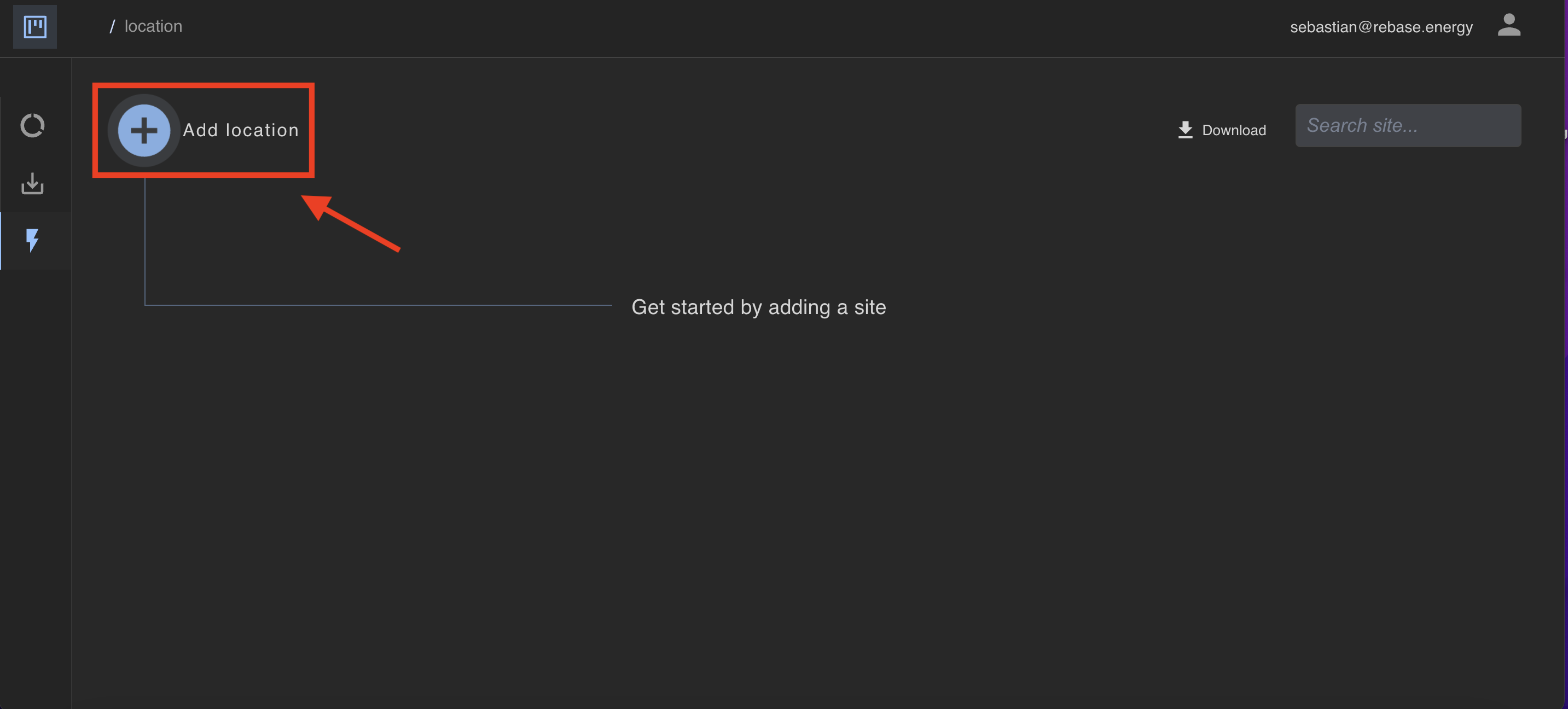
To create a site, start by clicking "Add location" in the top left corner of the screen.
 Then you'll end up at the following page, where you have the choice to create multiple sites at once (bulk mode).
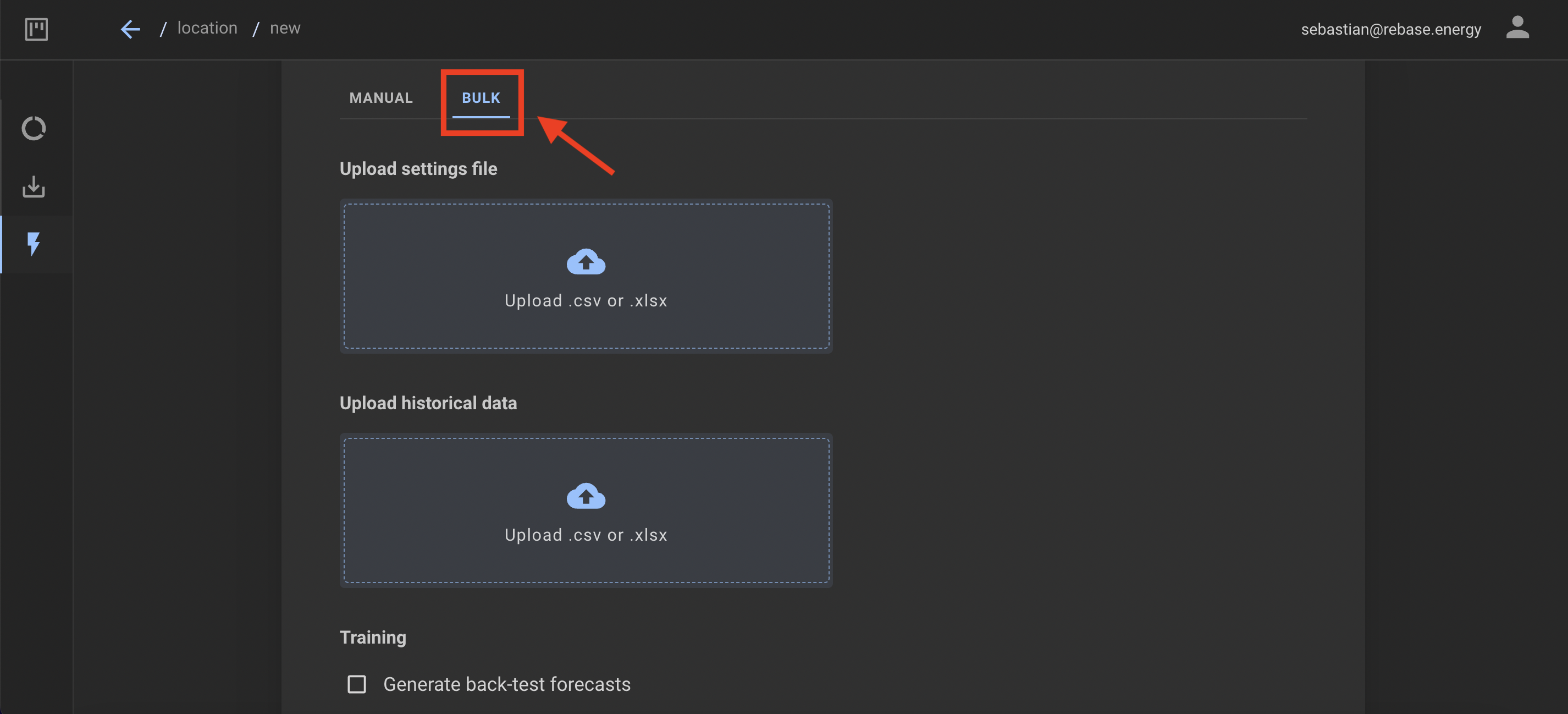 The files needs to be formatted according to a pre-defined structure for the upload to work. Find here an example
for .csv-files and here and example for .xlsx-files. See below for the definition of the energy asset objects and
their attributes.
The name of the site
Latitude of the site
Longitude of the site
Orientation of solar panels (0 N, 90 E, 180 S, 270 W) degrees
Tilt of solar panels (0 to 90) degrees
Capacity of site - array of JSON objects. Each JSON object should contain the capacity value in kW and the date (ISO 8601) from which the value is valid from.
The name of the site
Latitude of the site
Longitude of the site
Capacity of the site - array of JSON objects. Each JSON object should contain the capacity value in kW and the date (ISO 8601) from which the value is valid from.
The name of the site
Latitude of the site
Longitude of the site
The type of measurment. Should be a string of `WindSpeed`, `Temperature` or `CloudCover`.
The name of the site
Latitude of the site
Longitude of the site
Array of one or more NWPS to train on.
Available NWPS:
* DWD\_ICON-EU
* NCEP\_GFS
Array of variables to be used in the forecast.
Available variables:
* Temperature
* SolarDownwardRadiation
* WindSpeed
* WindDirection
* CloudCover
Array of calendar features that should be included in model training.
Available features:
* holidays: If the model should take public holidays into account
* hourOfDay: If the model should take into account which hour of the day it is
* dayOfWeek: If the model should take into account which day of the week it is
* weekOfYear: If the model should take into account which week of the year it is
This documentation is built and hosted on [Mintlify](https://mintlify.com), a developer documentation platform.
The files needs to be formatted according to a pre-defined structure for the upload to work. Find here an example
for .csv-files and here and example for .xlsx-files. See below for the definition of the energy asset objects and
their attributes.
The name of the site
Latitude of the site
Longitude of the site
Orientation of solar panels (0 N, 90 E, 180 S, 270 W) degrees
Tilt of solar panels (0 to 90) degrees
Capacity of site - array of JSON objects. Each JSON object should contain the capacity value in kW and the date (ISO 8601) from which the value is valid from.
The name of the site
Latitude of the site
Longitude of the site
Capacity of the site - array of JSON objects. Each JSON object should contain the capacity value in kW and the date (ISO 8601) from which the value is valid from.
The name of the site
Latitude of the site
Longitude of the site
The type of measurment. Should be a string of `WindSpeed`, `Temperature` or `CloudCover`.
The name of the site
Latitude of the site
Longitude of the site
Array of one or more NWPS to train on.
Available NWPS:
* DWD\_ICON-EU
* NCEP\_GFS
Array of variables to be used in the forecast.
Available variables:
* Temperature
* SolarDownwardRadiation
* WindSpeed
* WindDirection
* CloudCover
Array of calendar features that should be included in model training.
Available features:
* holidays: If the model should take public holidays into account
* hourOfDay: If the model should take into account which hour of the day it is
* dayOfWeek: If the model should take into account which day of the week it is
* weekOfYear: If the model should take into account which week of the year it is
This documentation is built and hosted on [Mintlify](https://mintlify.com), a developer documentation platform.